

Most developers probably don’t see building forms as a dream, but rather a nightmare. It’s often repetitive, error-prone, and not particularly exciting. An example in Gomibo’s case would be a way to set or update properties of the products we offer on our websites. Having to define all those fields manually, updating, validating, and parsing that data isn’t something we want to spend time on. With us evolving into a service-oriented architecture and replacing our monolith, we needed a more scalable and standardized way of dealing with forms.
That’s why we’re building Dynamic Forms: a system that lets us define forms once, use them across both front-end and back-end, and render them dynamically based on a common JSON structure defined collaboratively by the teams involved. Dynamic Forms ensures there’s a consistent form structure across projects and services (e.g. information for the checkout page). This in turn leads to less duplication of both front-end and back-end logic. All of this makes for easier communication and collaboration between teams. The goal is that it should be easy for any engineer in the company to create a form without any specialized front-end or back-end knowledge.
How it works
At its core, it’s a JSON-based schema that describes form fields, validation rules, grouping, metadata, and more. These schemas are generated in the application they’re used in using any data retrieved through the backend. We debated having the services generate the schema which can be retrieved through their API, but that would mean each service would have a specific endpoint tailored to a specific use case in a specific application which isn’t very RESTful.
Field definition example

In the above snippet of JSON, an example definition can be seen for a field where the user would fill in their first name. The type of the field (e.g. string or number), some meta data, and basic validation has been added in this case. The full JSON contains much more information like metadata about the form. The same data structure can be applied in case any fields need to be grouped together. The above example could be part of a general “personal information” group with additional fields like the person’s last name. When rendering the form this can be used to make that grouping visually clear.

Example of a rendered field.
Libraries (front-end and back-end)
The actual implementation of the Dynamic Forms protocol exists in a front-end (JavaScript/React) and back-end library (PHP) we built. These libraries implement the protocol in a way that’s native to that language (e.g. TypeScript types) and provide additional tools to make use of any form schema. In the case of the React library, this means a simple component which can be configured to render the form based on existing components/styling, while ensuring the form is formatted correctly through the protocol’s implementation.
- The React library turns any schema into a fully working form, using the components and styling of your choice.
- The PHP library makes it easy to validate form data server-side, without duplicating logic.
These libraries follow the shared protocol to ensure that forms behave identically, no matter where they run. But why reinvent the wheel and create another form library with so many already out there? Part of the reason is that we’re engineers and we simply like building stuff ourselves. While we did consider a library like React Hook Form, it would still require building something to make the Dynamic Forms protocol/schema work with those libraries. The biggest benefit here being a shared (cross platform) form definition specifically tailored to our needs. Do note that Dynamic Forms doesn’t include any form components itself as that’s up to the project to implement. This is due to differences in design systems between various projects. In the case of the React library, adding definitions for the various field types is very simple.
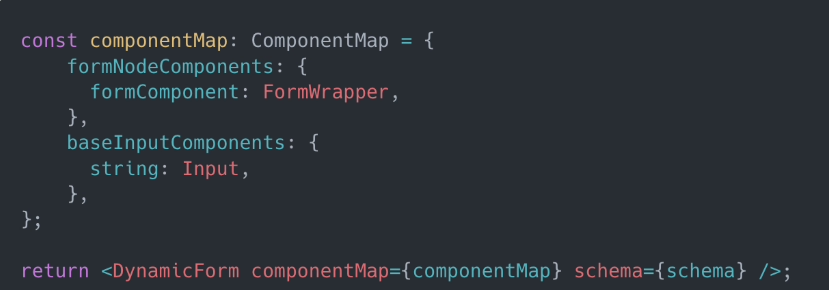
This shows a simplified example of how the React component is used. Here the general component for the actual form is defined, along with a general (text) input component for all fields that have string as a type.

Example of legacy back-office system.
While the interfaces in our old back-office have served us well, they can be improved because they were built during a time when we were in a growing phase and the most important goal was to implement changes fast. We had a team of five developers and basically no guidelines in terms of interfaces. Fifteen years later, things have changed drastically in our company and requirements. We’ve gotten a lot more international colleagues now for example, which means translations are essential in our interfaces. These translations aren’t always available as is evident in the screenshot above.
But perhaps the biggest shift is that those original back-office systems were designed for internal use only. With the move toward a SaaS model, we’re now also building tools that external parties will interact with. This requires a completely different mindset. One that emphasizes maintainability, usability, and scalability from the ground up.
The Hub is the new and better back-office we’re building. One of the projects we’ve built so far, involved developing interfaces to manage products. These products have some generic attributes (e.g. color), but depending on the product type they can also be more specific (e.g. noise cancellation for earbuds). These attributes are used to inform users of our websites, but are also used when filtering and searching products. A single product can easily have more than a 100 attributes which means a form needs to be created dynamically based on all of those attributes’ properties. This also includes some basic front-end validation like preventing entering non-numerical values in a numerical field. While the actual validation happens in the backend, it’s still good to have some validation client-side for an improved user experience. It’s a lot better to receive feedback when you’re at the actual field instead of receiving a bunch of errors at the end when the form is submitted.

Example of fields related to a phone’s connectivity features in the product information interface.
Challenges and what’s next?
While development has already happened on Dynamic Forms, it’s still in its infancy. Some boilerplate code is currently still required, which would ideally all be handled by the library itself. State management in React for example can be quite cumbersome. Especially when dealing with a lot of fields. Due to this reason, we might actually choose to implement a form library anyway in order to handle some of the more challenging parts.
Another thing is the lack of some common callbacks, like being able to pass an `onChange` handler. While the library itself should be handling most of these things for you, there are some instances where more complex actions need to be executed besides simply updating the state.
While we’re aware of the current challenges, it also serves as great input for future development to the libraries. In the end, this will only make for better tools. As mentioned, the goal is to make it easy to create forms regardless of specialized front-end or back-end knowledge.
As more Hub teams build their own pages, having easy-to-use, consistent form definitions is critical. The product information interface has already shown us what’s possible. We used to dread working on forms, but now we’re building tools that make them just another problem we’ve solved well.
In general, we’ll be taking a good look at the overall developer experience of the libraries. The addition of an existing form library for the React version could mean that we’re simply building a rendering engine to facilitate creating forms and that’s ok. We’re supposed to be building solutions for the (technical) problems we have, not trying to flex our coding skills by (re)creating things just because we feel like it.
Looking to grow as an engineer at Gomibo?
Whether you’re just getting started or already experienced, at Gomibo you’ll work on real systems used across the company. From back-end architecture to developer tools like Dynamic Forms, there’s always something interesting to build. See our open positions.